
Frequently asked questions
How PartPassport works, screen by screen: which documents it reads and which it files, what the requirements card holds, where each report goes in a job, how limits are entered, what the review shows, and what happens at signing. Screenshots are from a demo company with invented paperwork.
The basics
What is PartPassport?
PartPassport is a data book verification tool for castings and forgings. It holds each customer's standing requirements on a versioned card, reads the purchase order and the material certificates, checks every value against limits your own team entered from its licensed standards, files every other report in its section of the data book, and shows each value outlined on its page. A person reviews the findings and signs a verification report, then PartPassport assembles the data book in the customer's index order. It is in private beta.
Read more: How PartPassport works
Who is PartPassport for?
PartPassport is for the people who build and review data books. On the supplier side: quality managers, certification clerks and document controllers at foundries, forges and machine shops. On the buyer side: supplier quality engineers, receiving inspection, EPC document control and third-party inspectors who review a supplier's manufacturing record book. A buyer and its suppliers can use it together, so the requirements card is agreed on both sides.
Read more: For suppliers and For buyers
Which documents does PartPassport read, and which does it file?
PartPassport reads three kinds of document: the purchase order (read twice, prices dropped), material certificates (EN 10204 3.1 and 3.2 inspection certificates, ASTM certifications and mill test reports, read twice), and source records behind a certificate (spectrometer printouts and tensile, impact and hardness reports, compared with the certificate at its printed precision). Every other record in a data book is filed, not read: heat treatment charts, RT, UT, MT, PT and PMI reports, hydrostatic test reports, dimensional reports, coating reports, certificates of conformance, packing lists and photographs. Filed records are kept exactly as received in the section you choose, counted against the evidence plan, checked for blank, repeated and missing pages, and confirmed by a person on the review. Readers for NDT and test reports are on the roadmap.
- Read and checked: PO, material certificates, spectrometer printouts, tensile, impact and hardness reports.
- Filed, counted and confirmed by hand: heat treatment charts, NDT reports, hydrostatic and pressure test reports, dimensional reports, PMI, coating, certificates of conformance, packing lists, drawings.
Read more: Documents, what to upload where
Does the software decide whether a certificate passes?
No. The model reads; code decides. A language model reads the documents, and every value is located on its page from the PDF's own text layer. Plain, versioned code then compares each value with your verified limit, and critical values are read twice. If a value cannot be found, or a grade is not yet verified, the check goes to review. The tool never approves: a person makes every decision and signs.
Read more: The seven design principles
Is the PartPassport report an EN 10204 3.1 or 3.2 certificate?
No. The verification report is a record of what was checked, against which requirement version, with what evidence, and who decided. It is not an inspection document under EN 10204 and PartPassport is not an authorized inspection representative. The certificates in the book keep their own status; the report sits beside them.
Read more: EN 10204 3.1 vs 3.2
Can PartPassport detect forged or falsified certificates?
No document review can reliably catch a well-made forgery, and PartPassport does not promise fraud detection. It checks each certificate against the PO, your verified limits and its own source records at printed precision, and flags what does not agree. When the paper cannot settle a question, the right next step is a physical check on the part, such as PMI or a hardness test.
Read more: Why data books get rejected, including the forgery question
How accurate is PartPassport?
PartPassport is in private beta, so there is no real-world accuracy figure yet. Its release gate is a golden set of 45 synthetic cases with 67 seeded defects: all 67 are caught, with zero false flags, and any drop blocks a release. These are synthetic test cases, not a measure of real-world accuracy. The design limits the cost of a miss: a value that is not found, or a grade that is not verified, goes to a person instead of passing.
Read more: How PartPassport is tested
Getting started
What happens in the first fifteen minutes?
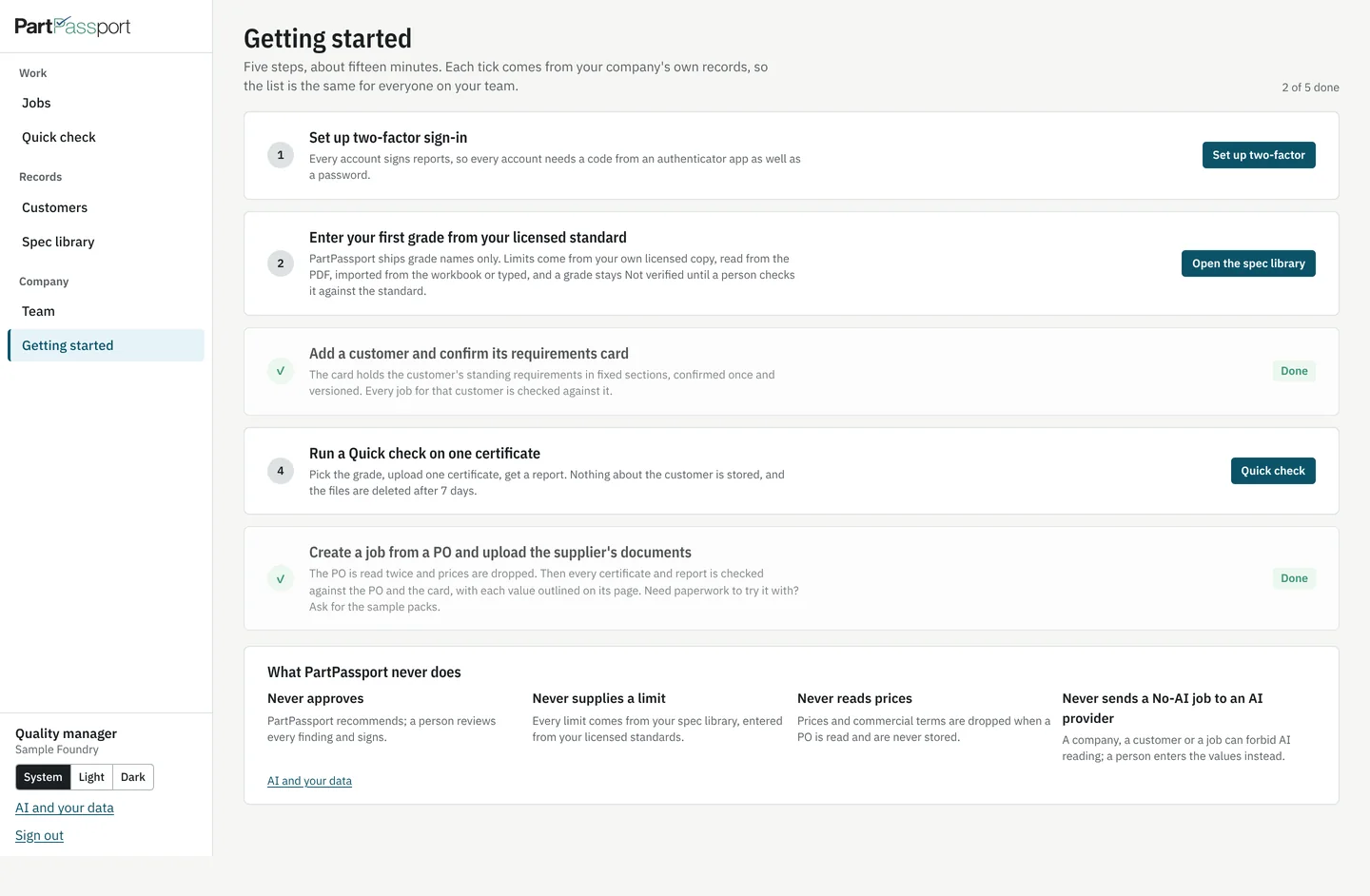
A new company lands on a Getting started checklist with five steps: set up two-factor sign-in, enter the first grade from your licensed standard, add a customer and confirm its requirements card, run a Quick check on one certificate, and create a job from a PO. Each tick comes from your company's own records, so the list is the same for everyone on the team. Once all five are done the home page becomes the job list, and the checklist stays in the menu under Company.
Read more: Apply for the beta
How are accounts and teams set up?
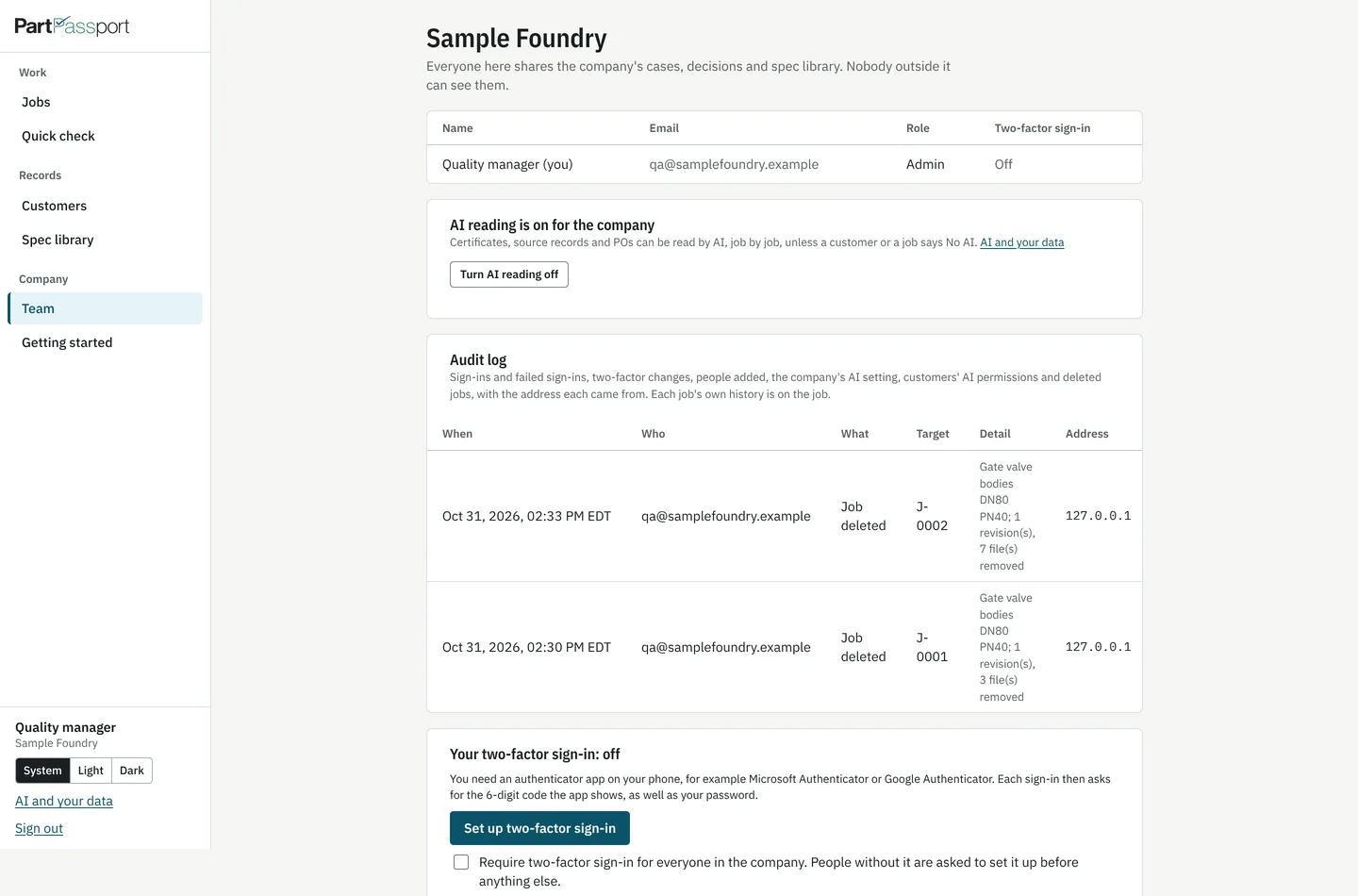
The first person to sign up creates the company and becomes its admin. Admins add people on the Team page with a temporary password that the person changes at first sign-in. There are two roles: a member can review, sign and edit limits; an admin can also add people, turn two-factor sign-in on for everyone, turn AI reading off for the company and read the audit log. Everyone in a company shares its customers, jobs, decisions and spec library; nobody outside it can see them.
Is two-factor sign-in required?
Every account can sign reports, so every account is expected to use two-factor sign-in. On the Team page, Set up two-factor sign-in shows a QR code for an authenticator app such as Microsoft Authenticator or Google Authenticator. Each sign-in then asks for the app's six-digit code, and each code works once. Eight recovery codes are shown once, for a lost phone, and an admin can reset a colleague's set-up. An admin can require it for everyone in the company. Signing a data book asks for your password again, not a code.
Can I try it without a customer or a PO?
Yes. Every new company gets a set of sample jobs with synthetic certificates and planted defects, so you can try the review before uploading anything of your own. Quick check lets you check one certificate against the spec library without a customer or a job. For a fuller trial, ask for the sample packs: eight invented orders as folders of PDFs, with POs, certificates, NDT, hydro, dimensional and heat treatment reports, each with a note of the defects planted in it.
Read more: What is Quick check?
Customers and the requirements card
What is a requirements card?
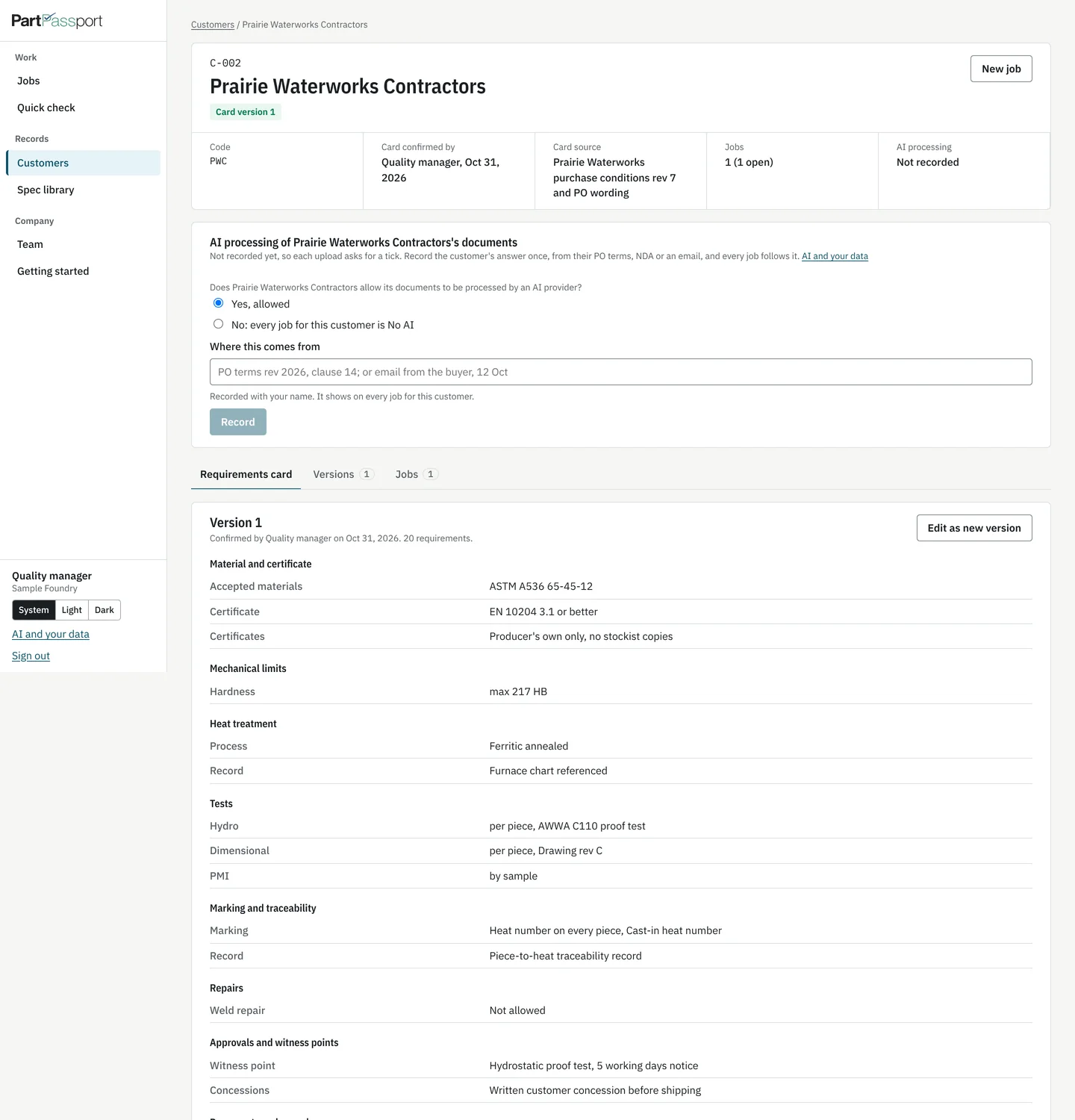
A requirements card is one fixed, versioned record of a customer's standing requirements for castings or forgings, confirmed once by a person and copied into every job for that customer. It replaces re-reading the same quality clauses, specifications and index instructions on every PO. The card has fixed sections, so two people fill it the same way, and every job records which version it was checked against.
Read more: How the requirements card works
What sections does the requirements card have?
The card has ten fixed sections, plus Destination and origin. Each one holds the customer's requirement in the customer's words, and each one feeds specific checks on the review.
- Material and certificate: the standards and grades the customer accepts, the minimum EN 10204 type (3.2 satisfies a 3.1 requirement), who must countersign a 3.2, whether the lab must be ISO/IEC 17025 accredited, whether only the producer's own certificate is accepted, extra chemistry limits and a carbon equivalent maximum.
- Mechanical limits: a customer hardness limit, NACE MR0175 compliance, Charpy impact at a stated temperature.
- Heat treatment: the required condition and whether a furnace chart must be referenced.
- Tests: RT, UT, MT, PT, VT, hydro, PMI, dimensional or ferrite, each per heat, per heat treatment load, per piece, first article or by sample, with the acceptance standard and the personnel qualification as the customer states them.
- Marking and traceability: heat and serial marking, the marking method, and whether a piece-to-heat record is required.
- Repairs: whether weld repair is allowed, with approval or not at all, how the customer defines a major repair, and whether repair maps go in the book.
- Approvals and witness points: first article or PPAP, the tests the customer witnesses, the notice period, and whether concessions must be in writing.
- Documents and records: the data book sections in the customer's order, the language, retention years and change notification.
- Quality codes: numbered clauses the customer prints on POs, applied only when the PO lists the code.
- Special clauses: anything else, word for word, with its source.
- Destination and origin: where the parts ship, and where the metal must be melted and poured.
What is the difference between a quality code and a special clause?
A quality code is a numbered clause the customer prints on some POs, such as SWQ03, and it applies only to a job whose PO lists that code. A special clause applies to every job for the customer. Both are kept word for word with their source, never paraphrased, and both appear on the review as items to confirm by hand, because code cannot check them.
What happens when a customer changes a requirement?
Edit the card as a new version and confirm it. Older jobs keep the version they were started with, so a book already in progress is not judged against rules that did not exist when it began. The job page says which card version it uses, and Change for this PO lets a person adjust the requirements for one job with a reason, which is recorded in the job history.
How do I record whether a customer allows AI processing?
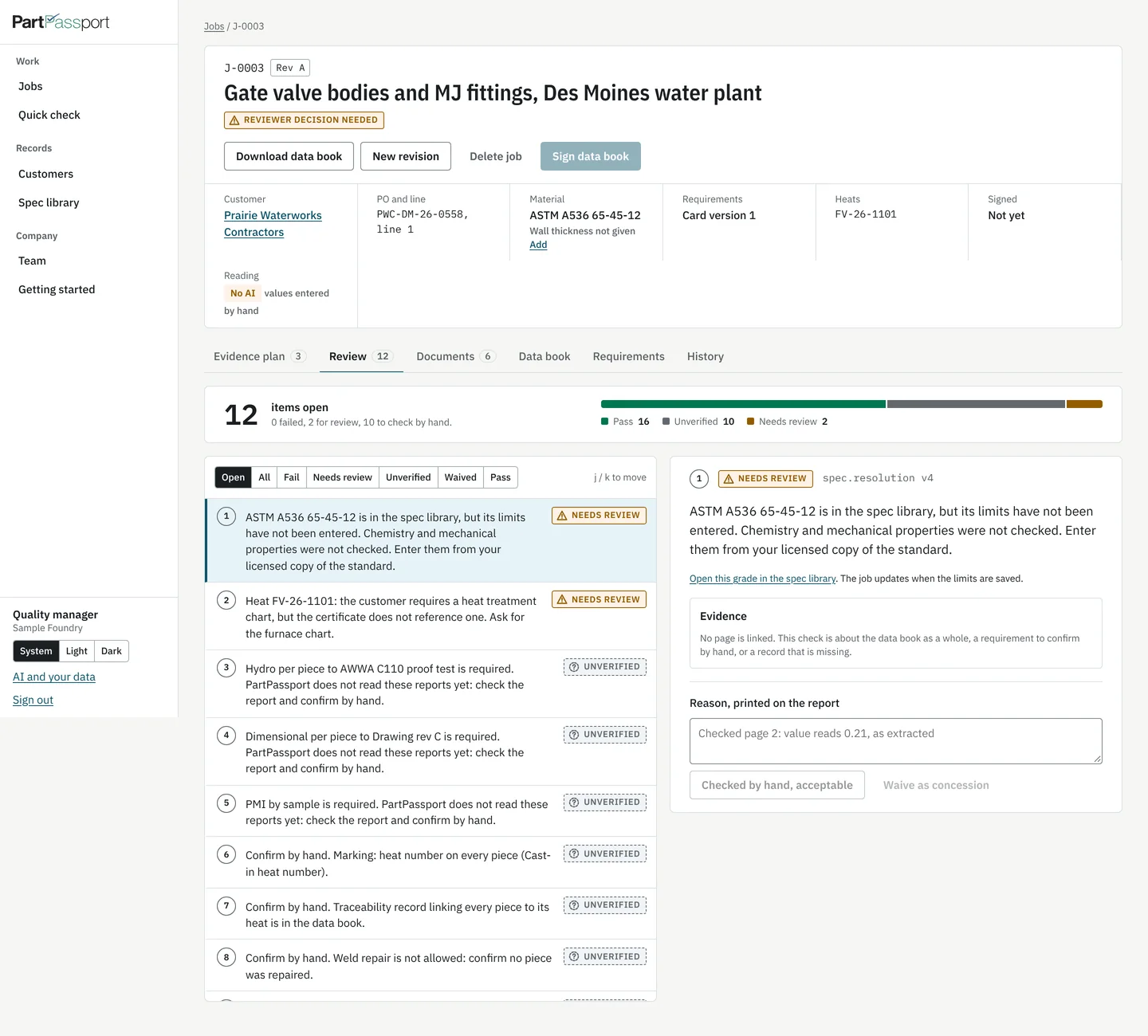
On the customer page, record once whether the customer allows its documents to be processed by an AI provider, and where that answer comes from: PO terms, an NDA or an email. Every job for that customer follows it, so uploads stop asking for a tick. Not allowed makes every job for that customer a No-AI job, with values entered by hand.
Read more: No AI, export control and your data
What does the Destination and origin section do?
It records where the customer's parts ship (United States, Canada, European Union, United Kingdom or elsewhere) and, when the order restricts it, the countries where the metal must be melted and poured, for example the United States under Buy America. When parts ship to one of those regions, certificates are read for the country of melt and pour, twice, and located on the page. A certificate that does not state it, or names a country the order does not allow, becomes a finding. The signed report and the part passport list it per heat.
Spec library and limits
Where do the limits PartPassport checks against come from?
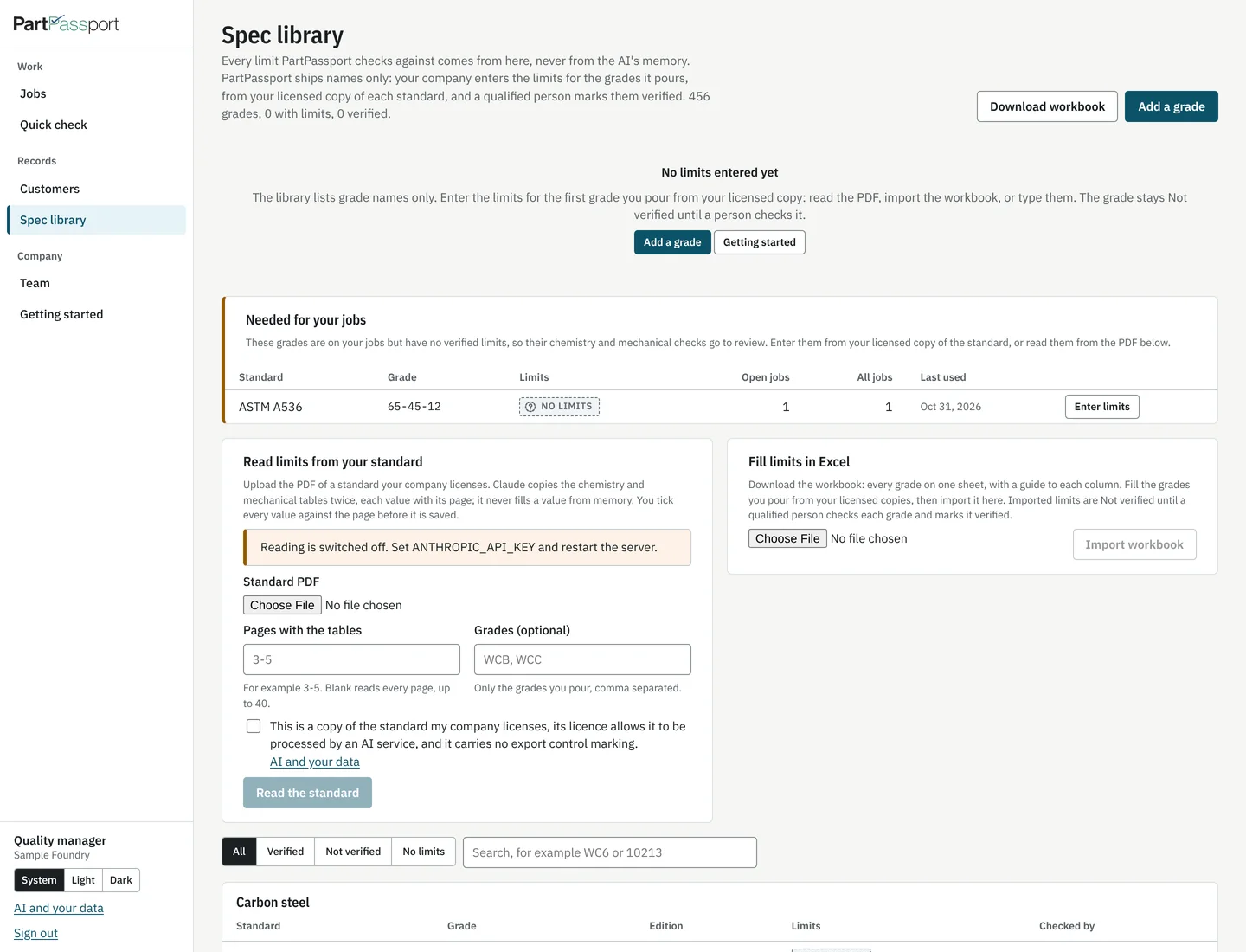
From your own licensed standards. PartPassport ships 456 grade designations across ASTM, EN, DIN, ISO and JIS by name, with no limit values. Each company enters the limits for the grades it pours or forges from its own licensed copy, and a qualified person marks each grade verified. Until a grade is verified, its chemistry and mechanical checks go to review, never to pass. Limits never come from memory or from a language model.
How do I enter limits for a grade?
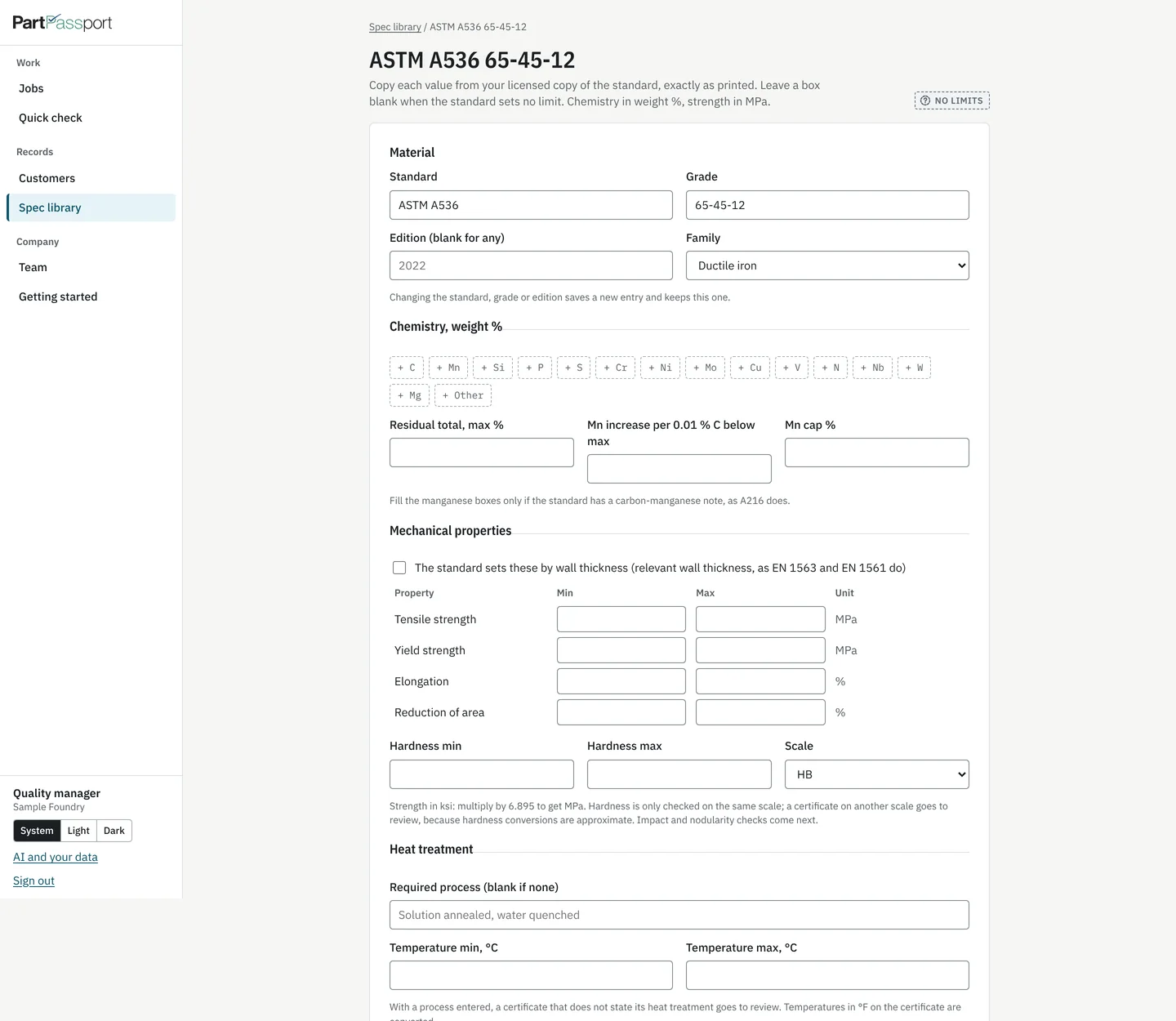
Four ways. Type them in the grade editor, one box per element and property, exactly as printed. Read them from your standard: upload the PDF your company licenses, with the pages that hold the tables; the tables are copied twice, each value with its page, and you tick every value against the page beside it before the grade can be marked verified. Fill the Excel workbook: download it from the spec library, fill the grades you pour, and import it; nothing is saved until the whole file is clean, and imported limits start as Not verified. Fill from a certificate: when a job's grade has no limits and its certificate prints some, the review offers to copy them as a Not verified draft, after asking twice whether you checked them against the standard.
What does "verified" mean for a grade?
Verified means a named person in your company has checked every value against a licensed copy of that edition of the standard and ticked the statement that says so. Their name and the date are recorded. Importing the same values again keeps the verification; a changed value loses it. A check against a grade that is not verified goes to review, with a link to open the grade.
How are limits that change with wall thickness handled?
Where a standard sets mechanical properties by relevant wall thickness, as EN 1563, EN 1561 and EN 10213 do, tick The standard sets these by wall thickness in the grade editor and enter one band per row of the table. Give the job's relevant wall thickness from the drawing when you create it, on the PO review, or when the review asks. Without it, or when no band covers it, the mechanical check goes to review. Changing a thickness already given needs a reason, recorded in the job history.
Can I type a material in any standard?
Yes. Wherever a material is entered, type it as the PO states it: GGG40.3, A351 CF8M, 1.4408, 5.3103, FCD400-18L. Matches from every standard appear underneath, with material and UNS numbers, and a note when the standard is withdrawn, such as DIN 1693, now EN 1563.
What are comparable grades, and when does one pass?
Once a material is chosen, PartPassport lists comparable designations in other standards from a cross-reference of 103 groups, such as EN-GJS-400-18-LT, JS/400-18-LT, FCD400-18L and ASTM A536 60-40-18 for DIN 1693 GGG-40.3. These are suggestions and stay unverified. Only designations a person keeps on the customer's card or on the job count: a certificate to a kept designation passes the grade check and is checked against that designation's own limits; anything else fails. One exception goes to review instead of failing: a certificate that states the designation that replaced the PO's, or the one it replaced. A person approves it for the job with a reason, which is printed on the report.
Starting a job and the PO
How do I start a job?
A job is one purchase order. New job, then either Read the PO or Enter by hand. Reading the PO: upload the PO PDF, tick that it carries no export control marking and that the customer allows AI processing, and PartPassport reads it twice and shows one screen to confirm. Entering by hand: pick the customer, type the PO number, line, material and wall thickness, and tick No AI if nothing in the job may go to an AI provider. Either way the job copies the customer's current requirements card, so later card changes do not affect it. Each resubmission of the book is a new lettered revision of the same job.
What does the PO review screen show?
One screen with everything read from the PO: the customer matched from the buyer name, the lines with part numbers, revisions, quantities and material, the PO number, and each clause that adds to the customer's card (certificate type, inspection body, NACE, special clauses, unknown quality codes). Where the two readings disagree, the field is marked and you pick or type the value. Accept or decline each clause, with a reason when declining. Nothing is created until you confirm. Certificate quantities are later checked against the ordered lines.
Does PartPassport read or store the prices on my purchase order?
No. The PO reader has no price fields. Prices, payment terms, Incoterms and tax are dropped during reading and never stored, and the PO's own PDF never goes into the assembled data book. If the customer wants a PO in the book, make a redacted copy without prices and file that instead.
Read more: Security and data handling
What is a revision, and when do I need a new one?
Revisions are lettered: Rev A is the first submission of the data book, Rev B the second, and so on. Start a new revision when the customer returns the book with comments or when documents change after signing. Earlier revisions, their reports and their assembled books stay exactly as they were.
Where do I see what happened on a job?
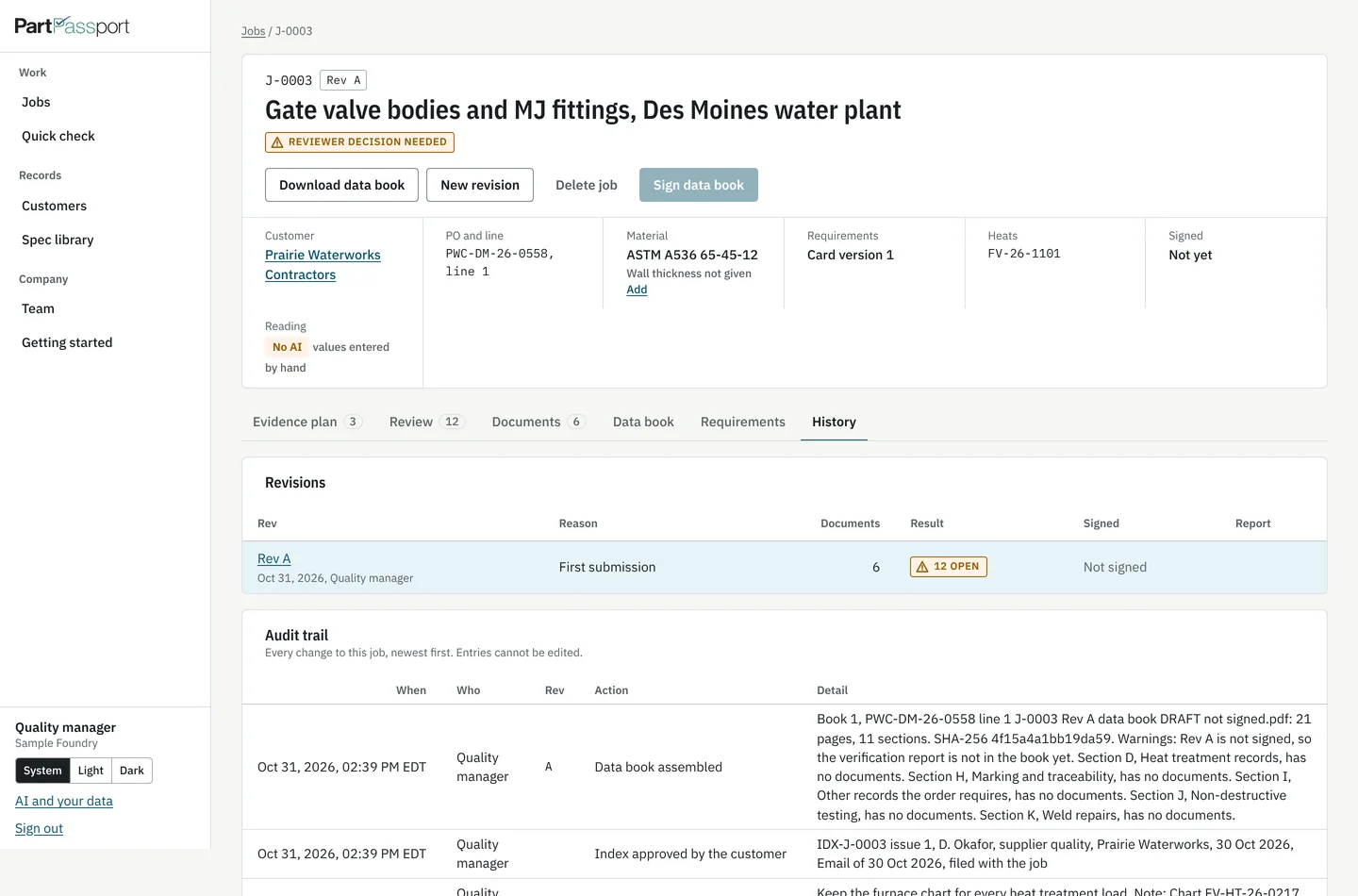
The History tab lists every event on the job with the person and time: documents added, values entered, findings decided, checklist items marked, index issues sent, replies recorded, requirement changes, signing and book assembly. It is the job's own audit trail and the reasons you give are printed on the report where they matter.
The evidence plan and before production
What is the evidence plan?
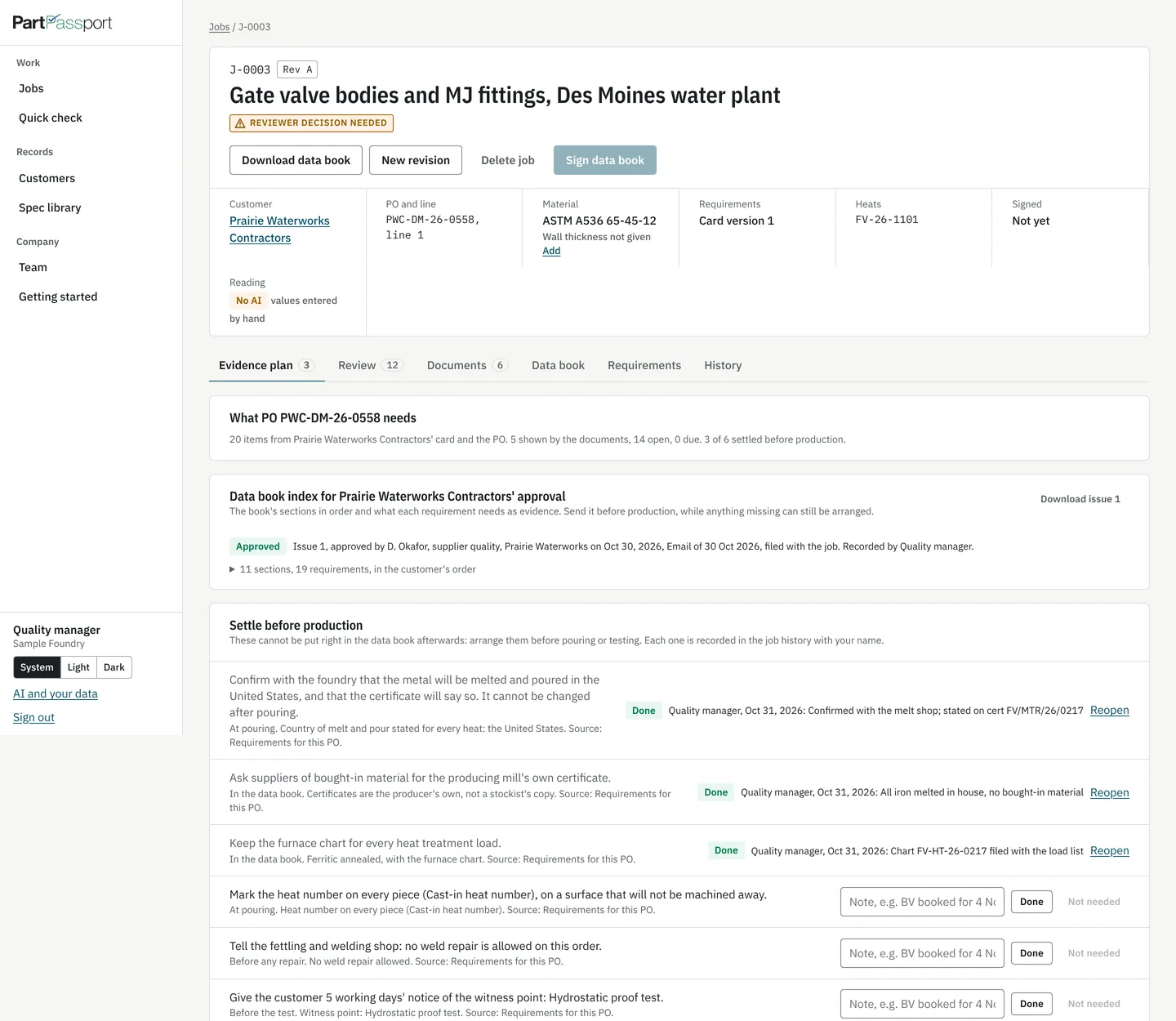
The evidence plan is the first tab of every job: one row for everything the customer's card and the PO ask for, grouped as Order, Certificate, Material, Tests, Process and Documents, with when it is due and where the requirement comes from. It is worked out from the card and the PO each time the page opens and is never stored, so it always matches the current requirements. As documents arrive, each row takes its status from the checks, per heat. Rows that no check can read say By hand. Rows with documents in but no check covering them say Not checked, so nothing passes by silence.
Read more: Before-production evidence checklist
What is "Settle before production"?
The items on the plan that cannot be put right in the data book afterwards: booking the inspector for a 3.2 or a witness point, keeping the Charpy bars with their heat treatment lot, keeping the furnace chart for every load, marking the heat number on a surface that will not be machined away, telling the welding shop that no repair is allowed, confirming where the metal will be melted and poured. Mark each one Done, or Not needed with a reason, and the mark goes to the job history with your name.
How do I get the data book index approved before production?
On the Evidence plan tab, Issue the index turns the plan into a PDF for the customer: the book's sections in their order, a compliance matrix with every requirement, where it comes from, when the evidence is produced and the section it will be in, the witness and hold points, and an approval block. Send it before production. When the customer replies, record it: approved (who, when, and where the approval is) or returned with comments. PartPassport never approves an index itself. Each issue is frozen; if the requirements change afterwards, the panel lists what changed and offers the next issue, which prints the changes.
Documents: what to upload where
What are the three kinds of document in a job?
When you add a document, you say what it is. A material certificate is read twice and checked against the PO, the card and your limits. A source record (a spectrometer printout or a tensile, impact or hardness report) is read twice and compared with the certificate at its printed precision; it is never judged against limits and stays out of the book unless you put it in. An other record (NDT, heat treatment, pressure test, dimensional and similar reports) is kept exactly as received in the section you choose and is not read. On a No-AI job, certificates and source records open the entry screen instead, where a person enters the values beside the page.
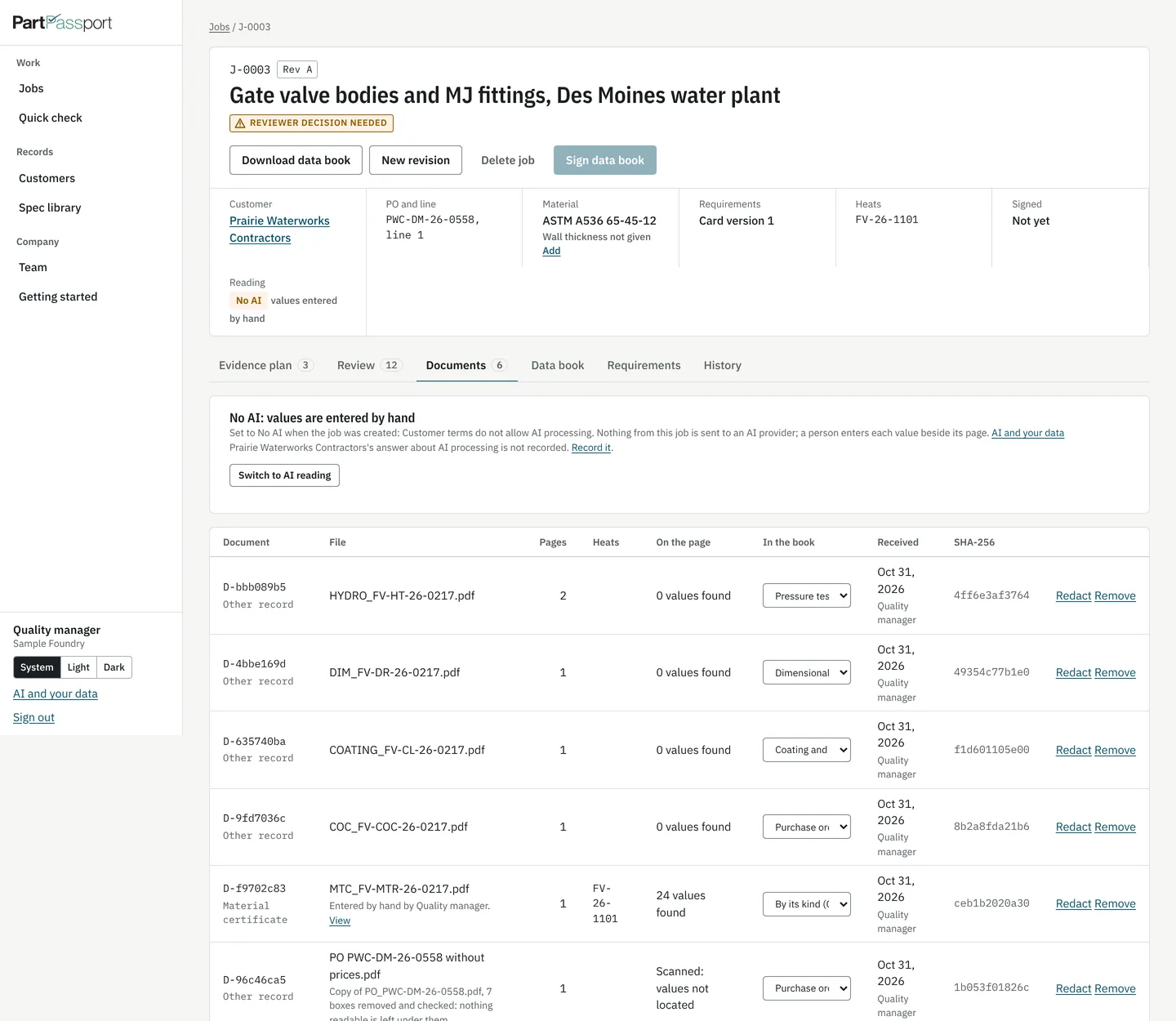
Which document goes in which section of the data book?
The sections come from the customer's index on the card, in the customer's words and order; when the card has none, PartPassport uses a default set. Documents a section needs that the index does not name go into sections added at the end. Typical placement for a casting or forging order:
- Cover and contents: made by PartPassport, with the approved index and the signed verification report.
- Purchase order, deviations and concessions: a redacted copy of the PO without prices, concessions, the certificate of conformance if the customer wants it there.
- Material certificates: the EN 10204 3.1 or 3.2 certificates, one per heat, uploaded as certificates, and hardness reports if the customer files them here.
- Heat treatment records: furnace charts and load lists, uploaded as other records.
- Non-destructive testing: RT, UT, MT, PT, VT, PMI and ferrite reports, uploaded as other records.
- Pressure test: hydrostatic, pneumatic, shell and seat test reports, uploaded as other records.
- Dimensional inspection and first article: dimensional reports, FAI and PPAP records, uploaded as other records.
- Marking and traceability: piece-to-heat records, marking photographs, packing lists, uploaded as other records.
- Weld repairs: repair maps and post-repair NDT, uploaded as other records.
- Other records the order requires: coating and lining reports, inspector release notes, anything the index does not name.
A document can be moved to another section, or left out of the book, from the Documents tab at any time.
Read more: What goes in a manufacturer's data book
What checks run on every uploaded file?
Package checks run at upload on every kind of document: blank pages, repeated pages, gaps in page X of Y numbering, password-protected or unreadable files, and whether pages are scanned. Each result is a finding, so a furnace chart with page 4 of 6 missing shows up even though the chart itself is not read. Every file is also searched for export control wording before anything else happens, and stored unchanged with a SHA-256 fingerprint.
What is a source record, and why upload the spectrometer printout?
A source record is the lab or instrument record a certificate value was copied from: the spectrometer printout for the chemistry, and the tensile, impact and hardness test reports for the mechanical results. PartPassport reads it twice and compares every certificate value with it at the certificate's printed precision, so 0.045 on the certificate matches 0.0453 on the printout. A value that differs, or one with no source, goes to review with both pages linked. Source records catch the transcription error that a limit check cannot see, because a wrongly typed value can still be inside the limit.
Read more: How is a certificate checked against its source records?
Does it work with scanned documents?
Yes, with limits. Digital PDFs have a text layer, and every value is located in it and outlined on the page. Scanned pages have no text layer, so PartPassport runs text recognition on the server itself (nothing is downloaded or sent anywhere) to locate values; a value found that way is outlined with a dashed box and labelled as found by text recognition, and a value it cannot find is shown as not located. Recognised text only locates: it is never a reading, never a second reading, and never changes a verdict. The export control search runs on scanned pages too, but a scan still needs a person's tick before AI reading, because a faint stamp can be missed.
Are there file limits?
Each PDF is read first by a separate worker with limits of 60 MB, 2,000 pages, 180 seconds and 2 GB of memory, so one bad file cannot take the service down. A file over a limit, or one that crashes the reader, is refused and never kept. Uploads of scanned files take longer, about 3 to 6 seconds a page for text recognition.
The review
What does the review show?
The Review tab lists every finding with a status badge, and the page beside it with the value outlined. Filter by Open, Fail, Needs review, Unverified, Waived or Pass; j and k move between findings. A finding names the heat, the value as read, where it was read (document, page, box), the limit it was compared with and the rule version that produced it. Zoom to the value centres the box on the page.
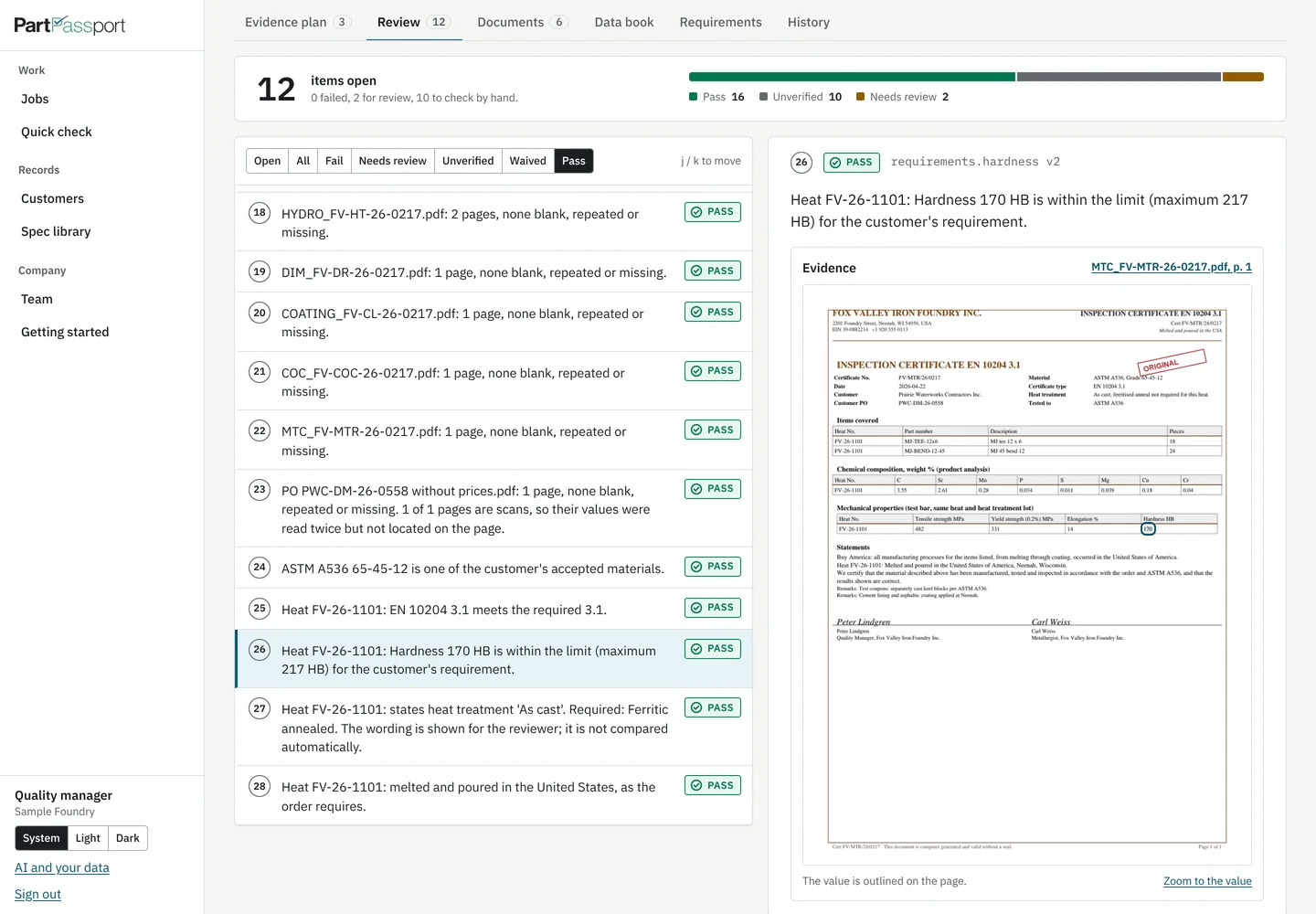
What do the statuses mean?
Pass: the value was found, read twice the same, and is inside the verified limit, or the requirement is met. Needs review: a person has to look, because the two readings differ, the value was not found on the page, the grade is not verified, a source record disagrees, or the wording needs judgment. Fail: the value is outside the verified limit or the requirement is not met. Unverified: a requirement PartPassport cannot check by reading, such as a hydro report or a special clause, waiting for a person to confirm by hand. Waived: a person accepted a nonconformance as a concession, with a reason printed on the report.
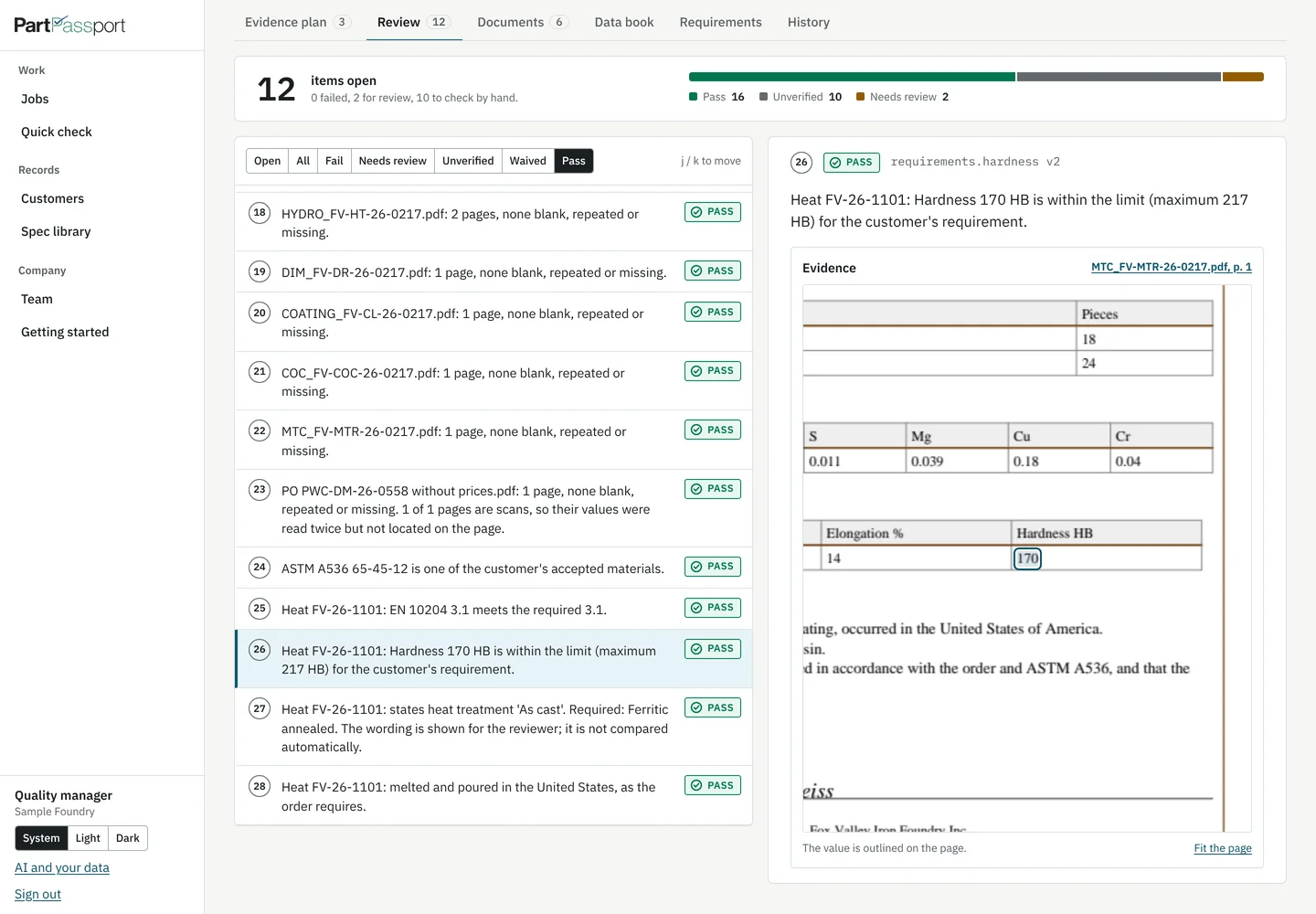
What can a reviewer do with a finding?
Three things, each with a reason that is printed on the report: Checked by hand, acceptable, for items the software cannot read, such as an NDT report or a special clause; Waive as concession, for a nonconformance the customer has accepted in writing; Confirm nonconformance, which keeps the fail and holds the book. A finding is never deleted. The reviewer's name, the date and the reason go into the job history and onto the signed report.
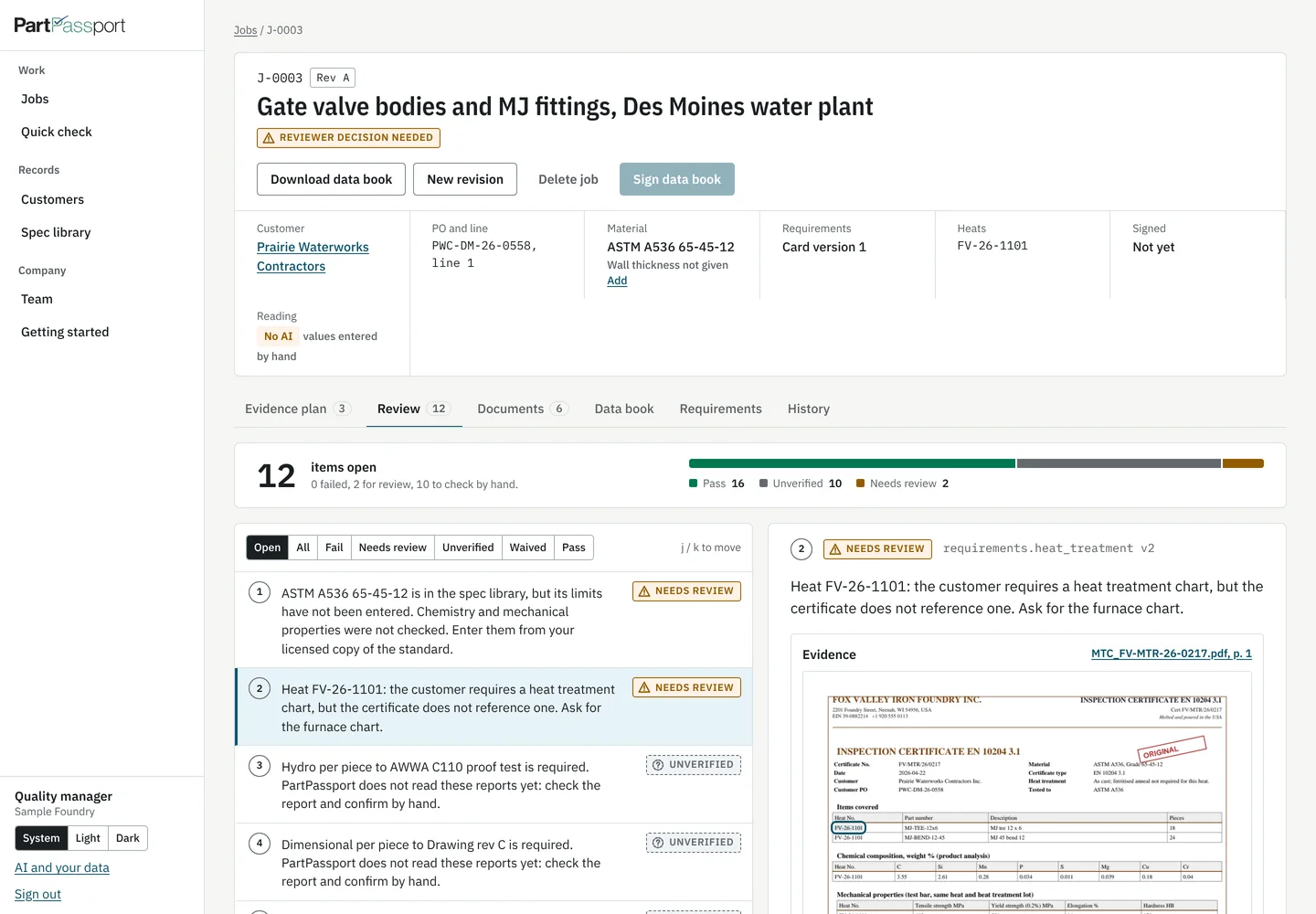
What are the four classes of findings?
Every finding belongs to one of four classes, so a reviewer sees at a glance whether the problem is the order, the material, the chain of identity or the paperwork. Contract conformance: PO number and line, part number and revision, quantity, grade, EN 10204 type. Standard conformance: values against limits for the grade, edition, thickness band and test temperature. Traceability: the same heat or serial on every document and on the part. Formal validity and format: signatures, stamps, issuer identity, legibility, missing pages, index, bookmarks, language. The signed report uses the same four classes.
Read more: Why data books get rejected
Why does a finding say "By hand" or "Not checked"?
By hand means no check can read that requirement from a document: an NDT report's extent, a witness point, a special clause, a marking requirement. It stays open until a person confirms it. Not checked means documents are in for that requirement but no check covers it yet, so it is listed rather than silently passed. Both are deliberate: nothing in a PartPassport book passes because nobody looked.
Why did a heat number go to review?
Heat numbers are critical fields, so they are read twice. If the two readings differ, or the heat on one document does not match the certificate (an O for a 0, a missing prefix, a transposed digit), the finding goes to review with every page where that identity appears. A person decides which reading is right.
Read more: Heat number traceability for castings
Signing, the report and verification
Who signs, and what does signing need?
A person signs each revision of the data book, after re-entering their password. Signing is blocked while any finding is still open, while a hand entry is unfinished, or while a required decision is missing; the job page lists the blockers. The signature records the name, the date and the card version, and the report is frozen from that moment.
What is in the verification report?
A PDF that lists every finding by class, with the heat, the value as read, the document, page and box it came from, the verified limit and edition it was compared with, the decision and the reason, and who made it. It names the requirements card version, the rule versions, whether values were read by the model or entered by hand and by whom, and any designation a person approved for the job. It carries a QR code that links to the verification page. It states that a person signed and that PartPassport never approves.
How does a buyer check that a report is genuine?
Scan the QR code on the report, or open its link, or upload the PDF on the verification page. PartPassport computes the file's fingerprint and compares it with the signed original: the page says whether the file matches, who signed, when, and against which card version. The file is sent only to compute the fingerprint and is not kept. The public check shows only the report's register entry, never job data, and it is rate limited per visitor.
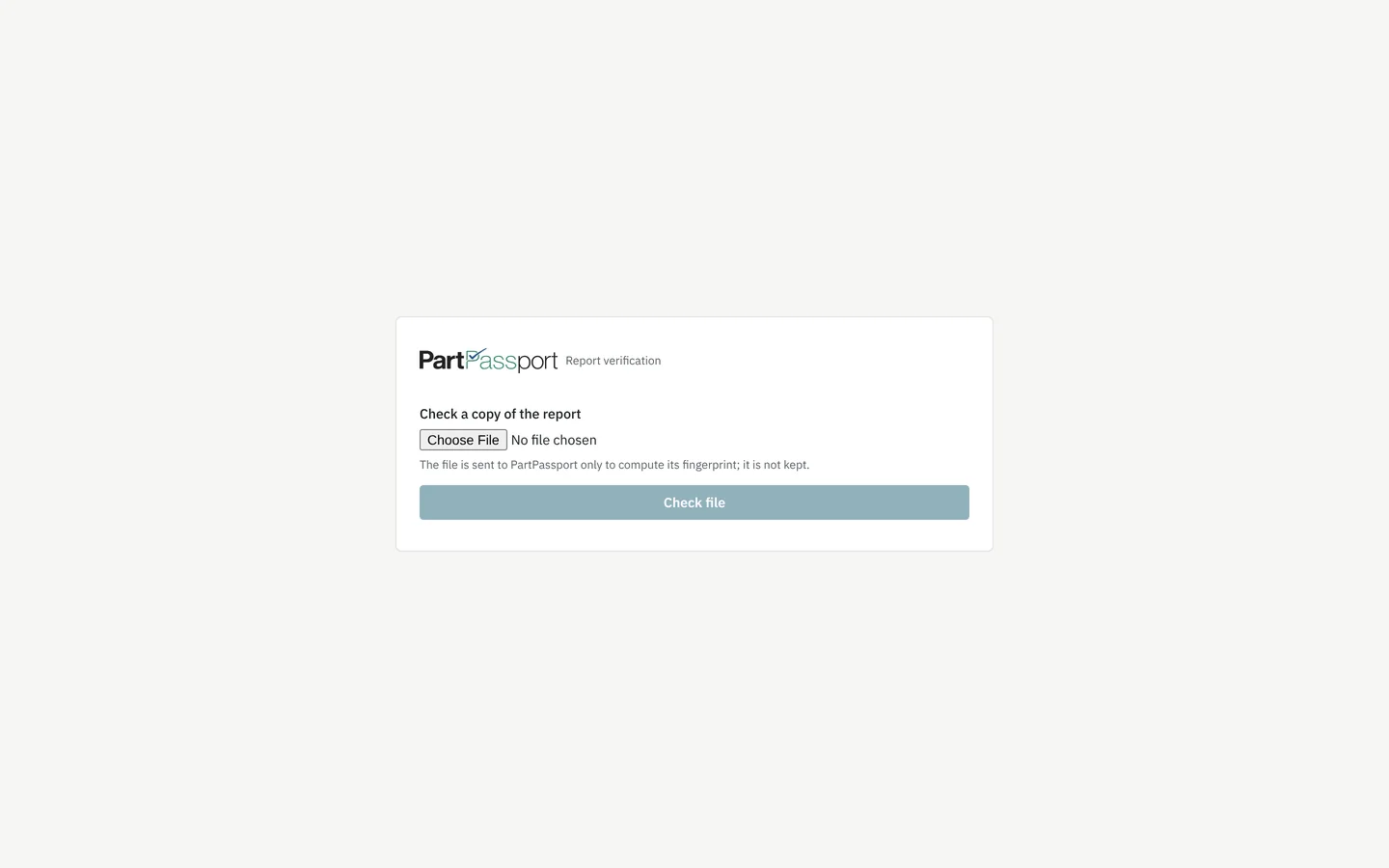
What is the part passport and the inspection summary?
At signing, PartPassport freezes a part passport for the order: the part, material, supplier, heats with certificate type and country of melt and pour, counts of checks by group, the documents with short fingerprints, and who signed when. A one-page inspection summary PDF is built from it for the buyer's inspector. Without a key, the public level shows no customer, PO, values or prices; with the key the supplier sends, the buyer's level adds the customer, the PO, the values as printed and the signed book. A No-AI job, or one with export control wording, is not published until a person publishes it.
Can I delete a job?
An admin can delete a whole job by typing its number: the job, its revisions, documents, findings, decisions, history and files go. The signed report's register entry always stays, so a QR code on a report already sent still verifies. The deletion is written to the company audit log.
Assembling the data book
How is the data book assembled?
The Data book tab shows what the book will hold section by section and what is still missing, then assembles one bookmarked PDF: a cover with contents, a divider for each section listing its documents and what it shows, the approved index and the signed verification report in the first section, and every document exactly as received. Every page gets its section page number and book page number in the bottom margin; a page already printed there is placed on a slightly taller sheet, so the stamp never covers anything. The PO's own PDF is never included.
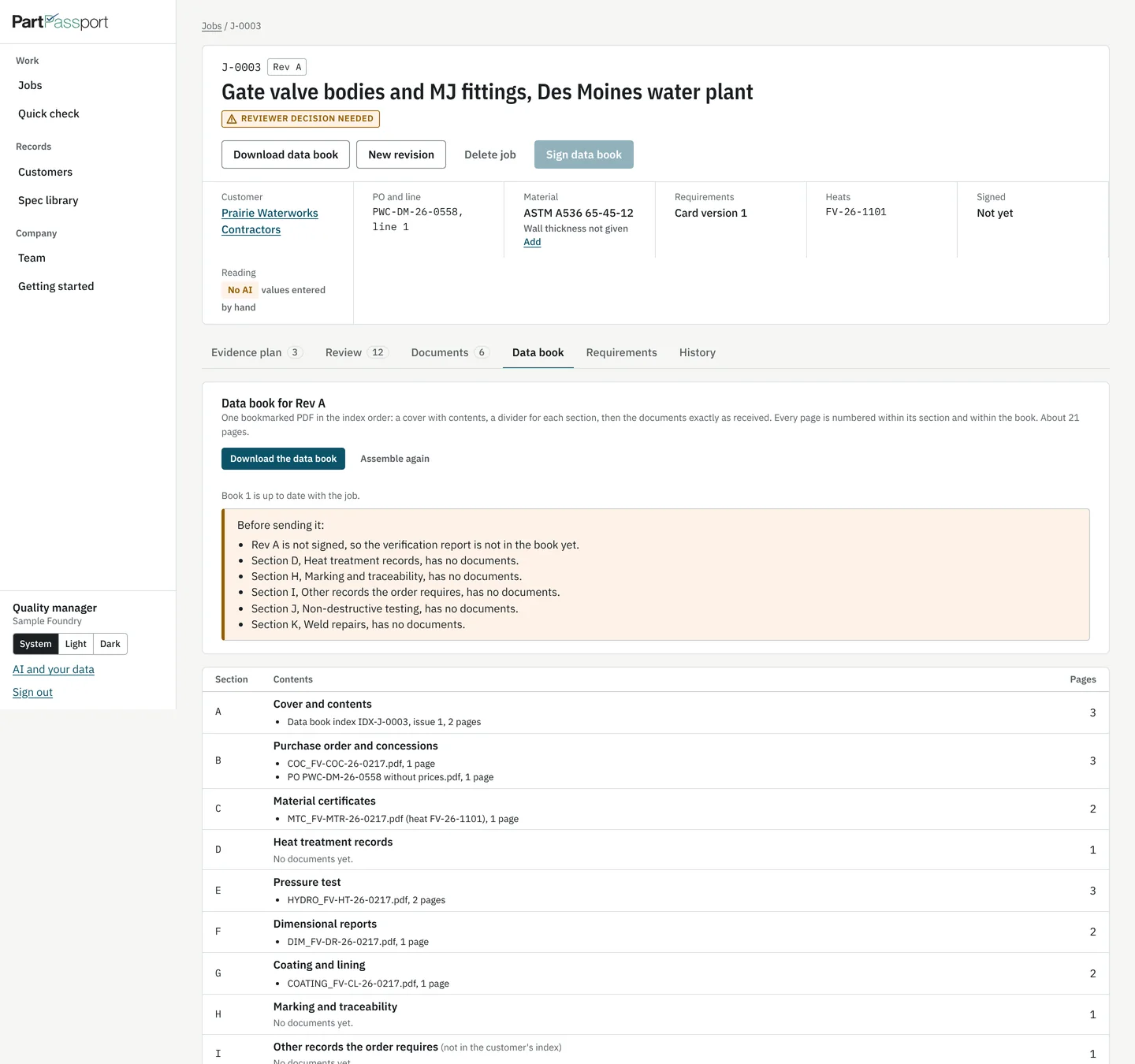
Can I download the book before it is signed?
Yes. A book assembled from an unsigned revision says DRAFT, NOT SIGNED on the cover, on every divider, in the file name and in every page stamp, so it cannot be mistaken for the final book. Download data book always gives the book as the job stands now: if anything changed since the last book, a fresh one is assembled first and the reason goes into the history. Earlier books stay downloadable exactly as they were.
How do I set the order of the sections?
The order comes from the customer's requirements card, in the customer's own words, so the second book for a customer looks like the first. If the card has no index, PartPassport uses its default order: cover, purchase order, material certificates, heat treatment, NDT, pressure test, dimensional, marking and traceability, weld repairs, other records. Section titles in a customer's index are matched to the evidence by their words, the same way every time.
Redacted copies
How does redaction work?
Any document can be copied with content removed, most often the PO without prices. Open the document page by page, drag on the page to draw a box, move or resize it, and press Delete to remove it. Suggest price boxes finds amounts and the numbers under price, rate, amount and tax headings from the page's own text, for you to keep or remove. Make the copy removes everything under each box from the copy (text, image pixels and line art), removes comments, form fields, links and the file's metadata, and rewrites the file. The original is never changed.
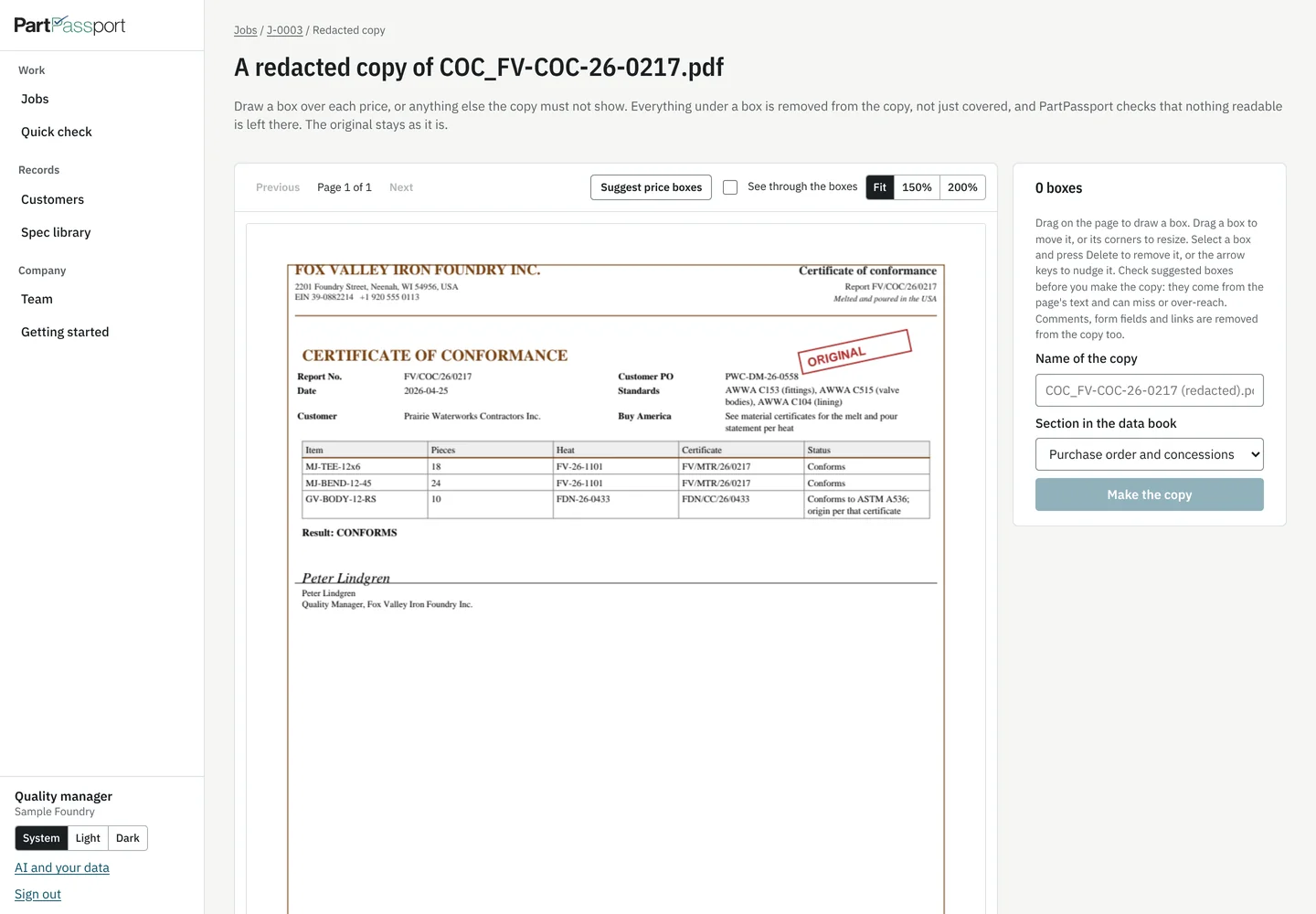
Read more: Security and data handling
How do I know nothing is left under the boxes?
PartPassport reads the copy back from scratch and searches for every word that was under a box in the whole file: the page text, every stored object and the raw bytes. If any word is still there, the copy is deleted and refused, and the message names the page. Pages that still show numbers shaped like amounts are listed for you to check. With the free PDF stack, a boxed page is flattened into an image, so it has no text layer at all. Scanned pages have no text to check, so check those by eye.
No AI, export control and your data
What reads my documents, and is my data used for training?
PartPassport reads documents through the Anthropic API. Anthropic is a processor for that data and its commercial terms exclude training on customer content; its privacy center states that API inputs and outputs are deleted within 30 days by default. Each company signs in and sees only its own data. Jobs can be screened for export control or confidentiality before any page is sent, and a No-AI job is never sent at all. PartPassport does not yet hold SOC 2 or ISO 27001 certification; SOC 2 is the next piece of work after the beta.
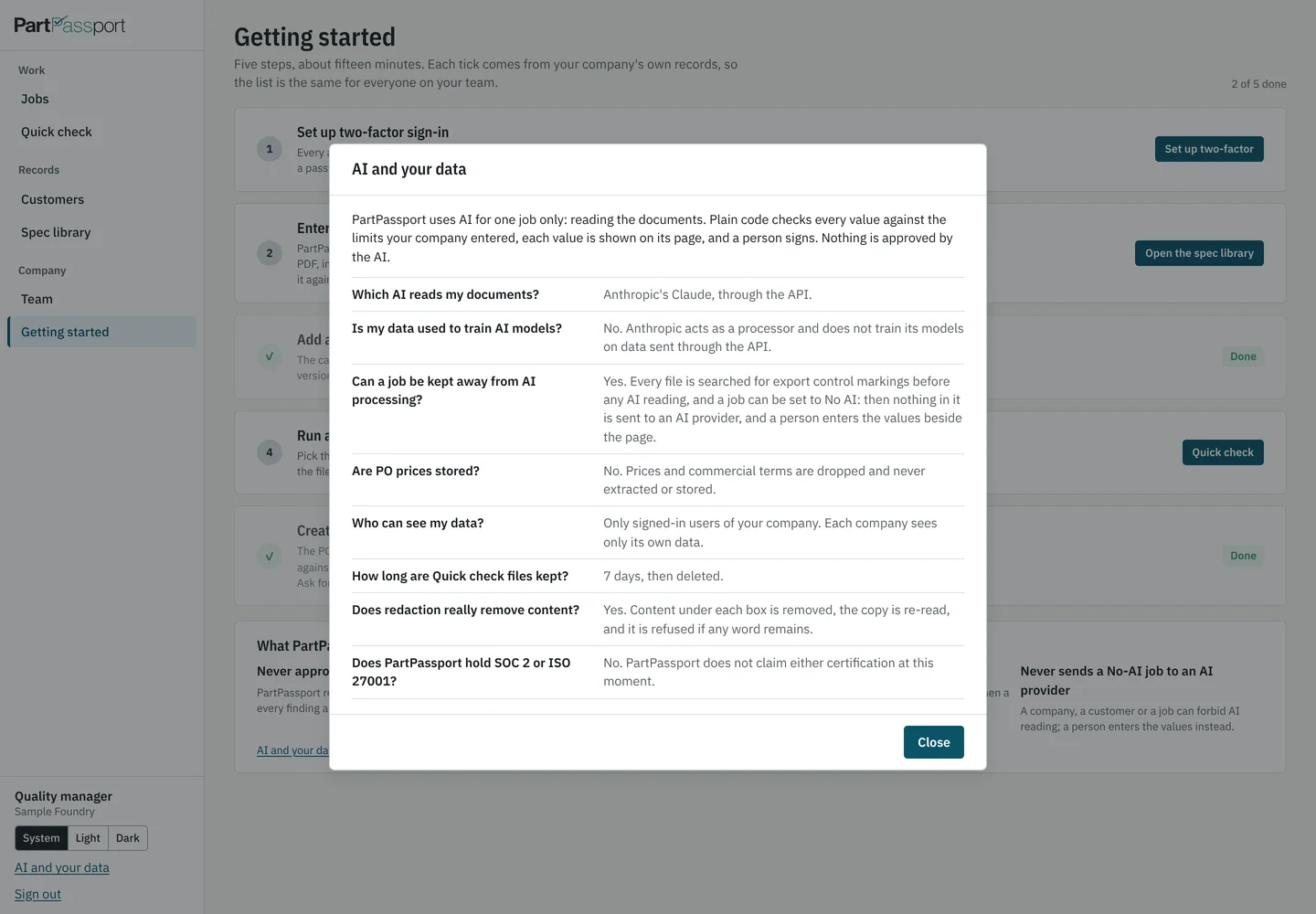
Read more: Security and data handling
How do I keep a job away from AI processing?
Three switches, each recorded with who and why. Company: an admin turns AI reading off for everyone on the Team page, and the server then needs no API key. Customer: record on the customer page that the customer does not allow AI processing, and every job for that customer is No AI. Job: tick No AI when creating a job by hand, or Set to No AI on its Documents tab. A No-AI job never switches back on its own.
Read more: No-AI mode
What happens when a file carries export control wording?
Every uploaded file is searched first for export control wording: ITAR, EAR, an ECCN, Export controlled, Controlled Goods, CUI, 10 CFR 810. A hit switches the job to No AI before anything is read. General terms such as the seller shall comply with ITAR also match; a person can mark such wording as not a control marking, with a reason, and then switch the job back. Scanned pages are searched by text recognition too, and still ask for a person's tick because a faint stamp can be missed.
How are values entered on a No-AI job?
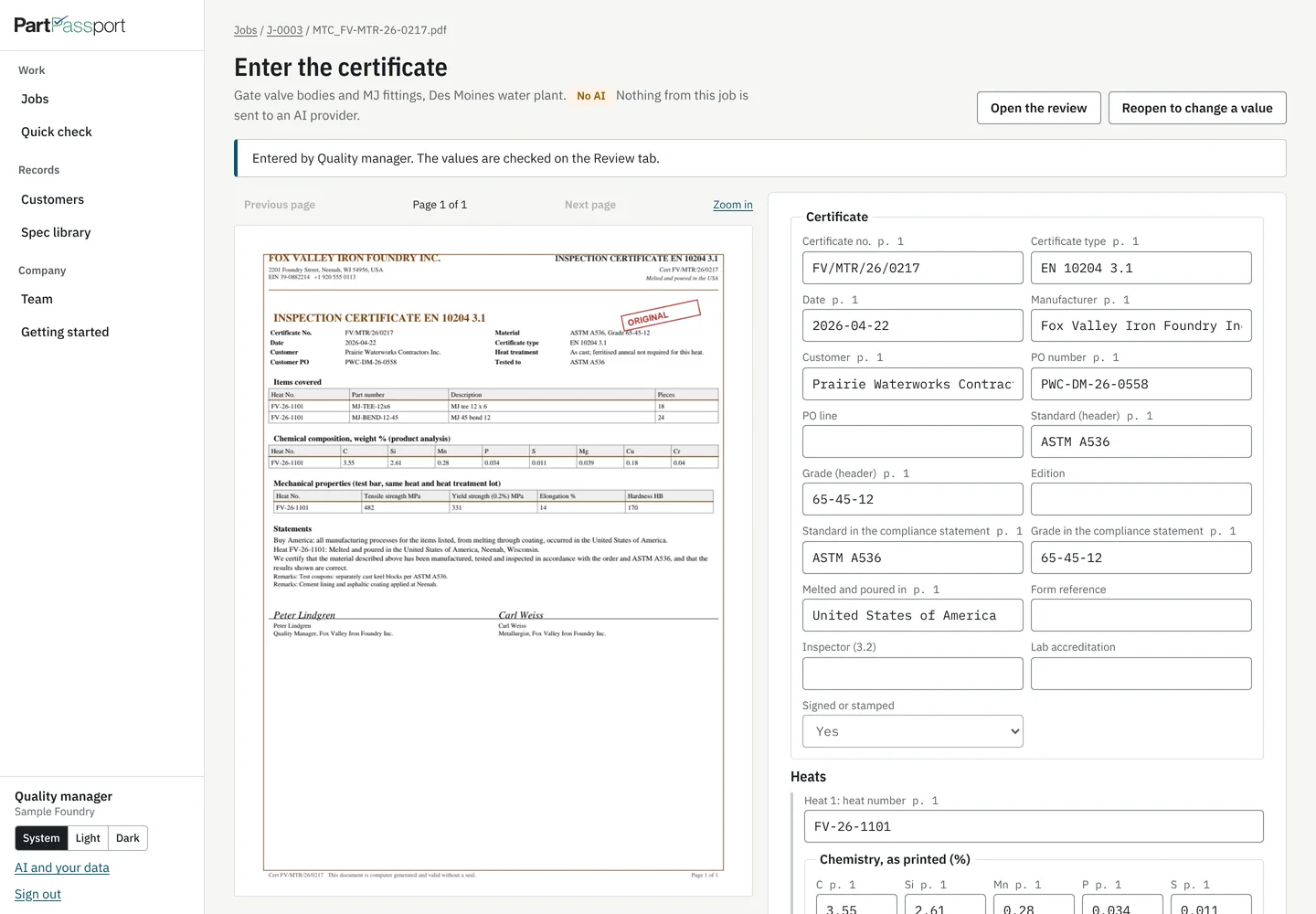
A certificate or source record opens the entry screen: the page on the left, the fields on the right. Click a field, then click the value on the page (shift-click adds the next word), or type it as printed. Finish and check runs the same rules as AI reading. On a digital page each typed value must be found in the page's own text, or it goes to review. On a scanned page the checked values are entered a second time by someone else, without seeing the first entry, and any difference goes to review. A data book cannot be signed while an entry is open, and the report says the values were entered by hand and by whom.
Where is my data stored, and for how long?
PartPassport runs on Microsoft Azure in Canada, with backups in a second Canadian region, encrypted in transit and at rest. Quick check files are deleted after 7 days. Files in the full flow are kept so the signed report, its evidence and the assembled book stay available; each company sets its own retention, from everything for a set number of years down to the extracted values and the signed report only. Deletion requests are completed within 30 days. Every uploaded file is stored unchanged with a SHA-256 fingerprint, and every reading, finding, decision and signature is in the job history.
Read more: The security questionnaire answers
Is there an audit log?
Yes, two. Each job has its own history of everything done on it. The company audit log, for admins on the Team page, records sign-ins and failed sign-ins, two-factor changes, recovery code use, password changes, people added, the company's AI setting, customers' AI permissions and deleted jobs, each with the address it came from.
Quick check
What is Quick check?
Quick check is the short path for a certificate you need to look at today. Pick the material as the PO states it, upload one certificate, optionally give the PO number the certificate must name, and get a report: package defects, values located on their pages and checks against your verified limits. No customer requirements are applied, because there is no requirements card. There is no signed verification report or assembled book, and the file and results are deleted after 7 days. A report you sign stays verifiable.
Read more: What is Quick check?
When should I use the full six steps instead?
Whenever the book must meet a specific customer's requirements, needs an evidence plan or an approved index, or will be signed and assembled. Quick check answers "is this certificate in limits and complete"; a job answers "does this data book meet this customer's order".
Data books and certificates
What is a manufacturer's data book (MDB)?
A manufacturer's data book (MDB) is the compiled record of how an item was made, inspected and tested, assembled for the buyer against the purchase order. For a casting or forging it typically includes PO references, material certificates, heat treatment records, NDT and test reports, dimensional reports and an index in the buyer's order. Other names include manufacturing record book (MRB), quality dossier and turnover package.
What is the difference between EN 10204 3.1 and 3.2 certificates?
Both are inspection certificates based on specific inspection of the delivered product under EN 10204:2004. A 3.1 is validated by the manufacturer's authorized inspection representative, who is independent of the manufacturing department. A 3.2 is validated by that representative and also by the purchaser's authorized representative or the inspector designated by official regulations, who usually witnesses the tests. The technical content is the same; the independent validation differs.
Read more: EN 10204 3.1 vs 3.2, explained for castings and forgings
Is EN 10204 being revised?
EN 10204:2004 remains the edition in force. A revision project was approved by CEN in June 2026, and a new edition is unlikely before 2028. Until a new edition is published, certificates are issued and checked against EN 10204:2004. We update this answer when the revision status changes. Last checked: 31 October 2026.
Read more: Revision status
What is the difference between a certificate of conformance and a mill test certificate?
A certificate of conformance states that the product meets the order but gives no test results; the closest EN 10204 equivalent is a type 2.1 declaration of compliance. A mill test certificate, or material test report, gives actual results from the delivered product, such as chemistry and mechanical properties. When an order calls for a 3.1 or 3.2 certificate, a certificate of conformance alone does not meet the requirement.
Read more: EN 10204 certificate types
Why do data books get rejected?
Most rejections fall into four classes of findings. Contract conformance: the book does not match the PO, part revision, quantity, grade or certificate type. Standard conformance: values sit outside the limits for the grade, thickness or test temperature. Traceability: the heat or serial differs between documents and the part. Formal validity and format: missing signatures, blank or missing pages, or the wrong index.
Read more: Why data books get rejected
Why is supplier payment held until the data book is approved?
On EPC projects, retention of about 10% of the PO value is typical for valves, pressure vessels and rotating equipment, and its release conditions include delivery of final documentation (Project Materials). In a 2016 DocBoss survey, 75% of suppliers reported payment holdbacks linked to documentation. A data book that is approved on first submission shortens the time that money is held.
Read more: The cost of a rejected book
What is heat number traceability for a casting?
Heat number traceability links each casting to the melt it was poured from, and from there to the chemical analysis, the test bars, the heat treatment lot and the certificate. A complete chain lets a reviewer move from the number marked on the part to the certificate values and back again. Breaks often appear where castings from several heats share one heat treatment load, or where test bars cannot be tied to a heat.
Read more: Heat number traceability for castings
Beta, cost and support
Who builds PartPassport, and how do we join the beta?
PartPassport is built by people who compile and review data books for castings, forgings and machined parts, and it is tested on real orders before it reaches design partners. PartPassport is in private beta and looking for design partners: foundries, forges, machine shops, and the buyers, EPCs and inspectors who receive their data books. Apply on the beta page.
Read more: About PartPassport and Apply for the beta
What does the beta cost, and what are the terms?
Nothing during the beta. Design partners sign a short agreement: three months to start, either side can end it with 30 days' notice, your documents are used only to run your jobs and to fix PartPassport for you, and nothing is said publicly about your company without written agreement. NDA and data processing agreement are available before the first call. Design partners receive the commercial price in writing before the beta ends.
Read more: Beta terms in plain words
What is on the roadmap?
Next are readers for NDT and test reports, so RT, UT, MT, PT, hydro and dimensional reports are checked for extent and serials instead of confirmed by hand; a second approver; card variants by part class; a supplier register; and whole data book upload, where one PDF is split into its documents. Design partners set the order, starting with their hardest customer requirement. Nothing on the roadmap changes the rule that a person signs.
How do I get help?
Email [email protected] for anything, [email protected] for a security issue, and [email protected] to ask for your data to be deleted. Design partners have a named person on the team and a reply within one working day.
Still have a question?
Email [email protected] and we will answer. If your question is about your own orders, the quickest route is to apply for the beta and mention it in the form.
Become a design partner
PartPassport is in private beta. Start with one data book you have already shipped: we walk through it with you in PartPassport on a 30-minute call.